SmartMount
SmartMount is a utility that allows you to mount filesystems contained in logical and physical disk image files. It automatically detects the partitions and filesystems in your images. Simply point and click the volume(s) you wish to mount. It’s that easy!
Filesystems mounted in SmartMount behave just like regular volumes. They are assigned a drive letter in Windows and a filesystem mountpoint in Linux. You can browse these volumes in your favorite GUI environment using any tools you like. Tools that index, search, recover, carve, repair or examine images and filesystems work as you would expect.
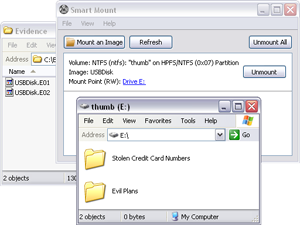
- Mount EnCase/Expert Witness (.E01 files), VMWare Disk (.vmdk files), FTK, SMART, SAW or dd files locally or over the network.
- Convert EnCase/Expert Witness and .vmdk files to “flat” image files
- Mount password protected EnCase/Expert Witness .E01 files without the password
- Mount file systems from within dd images or Macintosh .dmg images
- Mount file systems from within FTK images
- No need to re-acquire evidence, no need for write-blockers.
Multiple layers of write-protection ensure that the data in your image files will not be modified. SmartMount provides a protected read/write mount mode, writes are redirected to a separate overlay file. Changes made in past SmartMount sessions can be included by reusing an overlay file. Overlay files can also help you detect and isolate changes made while the image is booted in a virtual machine. Overlay files also allow you to repair corrupted file systems within images, remove and reset passwords within images, boot images in a virtual environment and much more.
SmartMount automatically recognizes and supports many common disk image formats. Even if you have an EnCase/Expert Witness image made up of 300 segment files, SmartMount makes it easy. What’s more, SmartMount allows other applications to access the image data even if those applications don’t support split images or special formats. There is no need to waste time and storage space re-imaging your data! Just fire up SmartMount and within seconds your image data is unlocked and ready to use with any application that supports dd-style images (in Linux) or can operate on a drive letter (in Windows).
When used in conjunction with the “Study” feature, SmartMount in linux mounts a “forensic” read-only filesystem that contains active files, deleted files, orphaned filesystem objects and unallocated space. This mountpoint can be shared / exported to the entire network and even re-imaged. This means that studied filesystems no longer require a forensic tool, dongle or specialized (expensive) tools or training for anyone to review.
Studied filesystems may also be mounted without the underlying image data. This is huge in matters involving title 18 materials, redactions and intellectual property concerns. This approach is extremely efficient for performing numerous types of investigations and analyses on large servers, cloud based filesystems, multi-terabyte SANs and many other systems that have been challenging or unavailable using traditional approaches.
What disk image formats are supported?
- raw (dd-style) images
- SMART for Linux images
- Expert Witness/EnCase Format (including “.E01” style files)
- VMWare Virtual Disk files (including sparse and segmented VM disks)
- Smart Acquisition Workshop format
- …and more coming soon!
What partitioning schemes are supported?
Some other image-mounting utilities require you to specify partition offsets manually. Put away that calculator and start using Smart Mount!
- MBR (Normal PC Partitions)
- EFI / GPT (MBR Replacement; used by Apple and others)
- APM (Legacy Apple Partitions)
What filesystem types are supported?
Almost any filesystem supported by the underlying OS can be safely mounted using Smart Mount.
- Microsoft Windows includes support for NTFS, FAT, ISO (CD-ROM), and UDF (DVD). Third-party drivers for other common filesystems (such as HFS+ and Ext3) are available for free online and are listed below. These have been tested and are believed to function as expected (your mileage may vary).
- EXT2/3: http://www.fs-driver.org/
- Reiser: http://p-nand-q.com/e/reiserfs.html
- Macintosh: http://www.macdrive.com/
- Linux supports over 40 different filesystems. Most distributions include support for the majority of these filesystems “out of the box”, with no extra installation or configuration required.
Smart Mount provides automatic detection of the following filesystem types, which helps automate the mounting process.
- NTFS
- FAT12, FAT16, FAT32, ExFAT
- HFS and HFS+ (including HFSJ and HFSX)
- Ext2 / Ext3 / Ext4, JFS, XFS, ZFS, ReiserFS
- ISO9660 (CD-ROM)
- UDF (DVD)